
Apple has quietly re-enabled a straightforward way to discover exactly when your Mac was built with the release of macOS 27 Golden Gate. By navigating to a regulatory menu inside System Settings, Mac owners can now view an official date of manufacture that was obscured for years after Apple switched to randomized serial numbers.
For anyone auditing a used computer purchase, managing enterprise IT hardware lifecycles, or simply curious about how long their machine sat in a warehouse before delivery, the restored metric provides crucial visibility. Here is everything you need to know about where to find the data, how it works behind the scenes, and an important technical catch regarding repaired computers.
The Discovery Inside macOS 27 Golden Gate
The feature went largely unheralded during Apple’s Worldwide Developers Conference and throughout the summer operating system beta cycle. Apple did not feature the change in keynote presentation slides or top-line marketing materials, leaving the addition to be uncovered by eagle-eyed MacRumors forum community members, notably user pdfu.
Inside macOS 27 Golden Gate, the operating system's regulatory compliance window now includes a dedicated field labeled "Date of Manufacture". While Apple has long complied with regional electronic labeling mandates across global jurisdictions, integrating an explicit build date directly into the desktop user interface solves a nagging information gap that has frustrated hardware enthusiasts since early 2021.
Step-by-Step: How to Check Your Mac's Manufacture Date
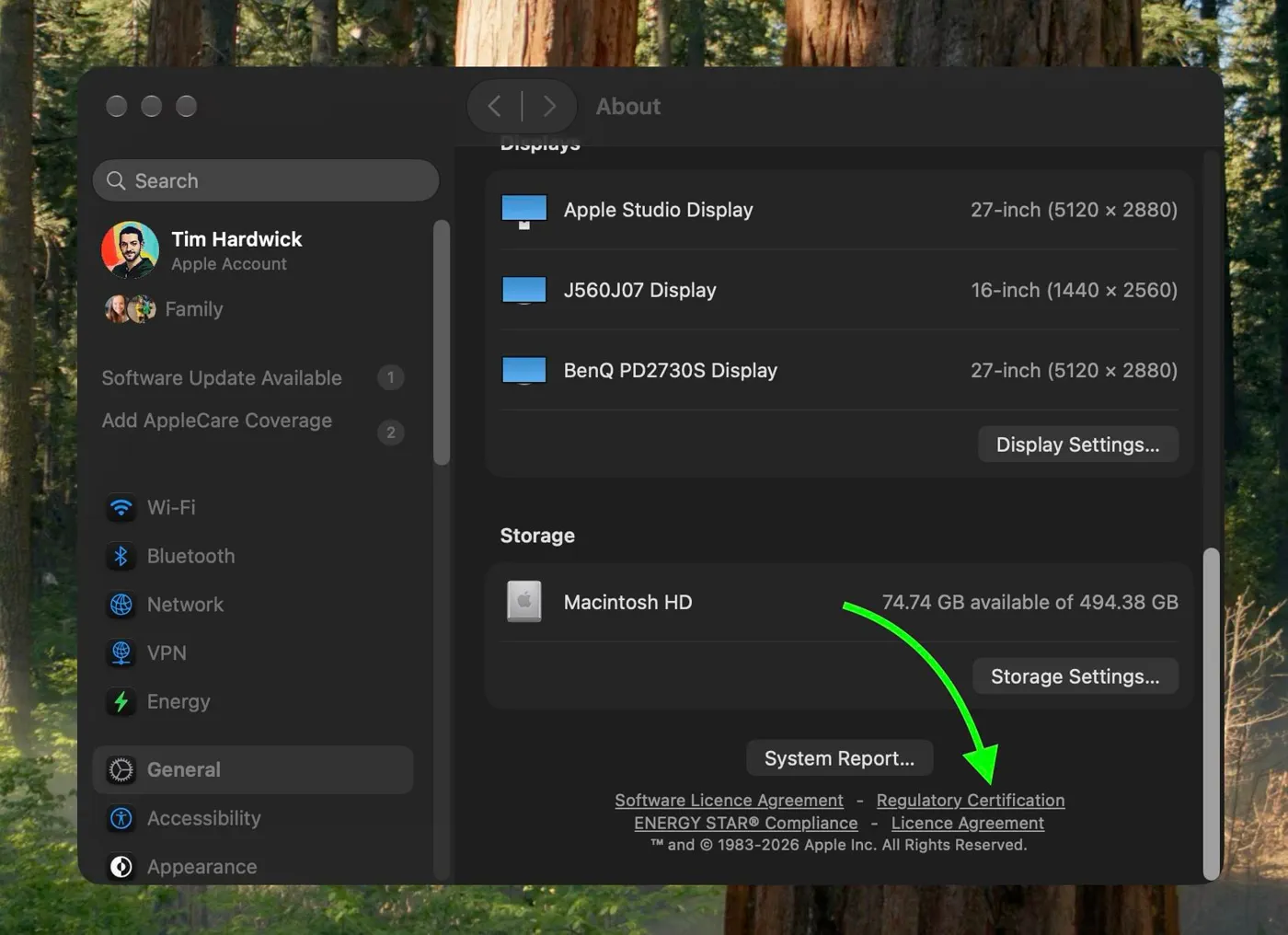 Photo: MacRumors: Mac News and Rumors - Front Page (source)
Locating the date requires no third-party diagnostics or paid system monitors. As long as your Mac is running macOS 27 Golden Gate or later, the information is built directly into System Settings:
- Click the Apple menu () in the upper-left corner of your display and select System Settings.
- In the left sidebar, click General, then select About.
- Scroll down past your hardware summary and storage indicators to locate the Regulatory Certification button (positioned right beneath the System Report button).
- Click Regulatory Certification to open the overlay pane.
- Scroll to the very bottom of the certificates and compliance marks.
- The final line displays "Date of Manufacture" alongside the recorded month and year (or exact date string).
The Advanced Terminal Method for Precise Timestamps
For power users, system administrators, and diagnostics technicians who want an exact assembly timestamp rather than just a month and year label, macOS 27 logs the precise read event in system diagnostics.
By keeping System Settings closed and launching Terminal, users with private logging visibility can query the SystemProfiler subsystem. Running the following command establishes a live log filter:
``bash log stream --style compact --level debug --predicate 'subsystem == "com.apple.SystemProfiler" AND category == "RegulatoryCert" AND eventMessage CONTAINS "dateOfManufacture: got date:"' ``
With that process listening in the background, open the Regulatory Certification window again in System Settings. The Terminal window will capture the query and output the unformatted internal timestamp down to the hour, minute, and second recorded in the system metadata catalog.
Why This Information Vanished in 2021
To understand why this small UI addition matters, you have to look back at how Apple structured device identifiers for decades. Prior to 2021, Apple hardware utilized alphanumeric serial numbers that followed a rigid, predictable schema.
In that legacy format:
- The first three characters typically identified the factory and manufacturing line.
- The fourth character represented the half-year of manufacture.
- The fifth character pinpointed the exact production week within that half-year.
- The final characters indicated unique machine traits and model configurations.
Anyone could plug a Mac, iPad, or iPhone serial number into free utility websites like Chipmunk or battery-profiling tools like CoconutBattery and instantly view the factory location and calendar week the device rolled off the assembly line.
In early 2021, starting with select iMac and iPad models before rolling across all MacBooks and iPhones, Apple eliminated the predictable format in favor of randomized 10-character to 12-character alphanumeric strings. Apple made the switch primarily to improve supply-chain security and reduce serial-number fraud, warranty cloning, and speculative reverse-engineering of factory yields. However, the move completely broke third-party serial decoders, leaving owners unable to verify when their hardware was made without querying Apple support directly.
How macOS 27 Compares to Legacy and Mobile Methods
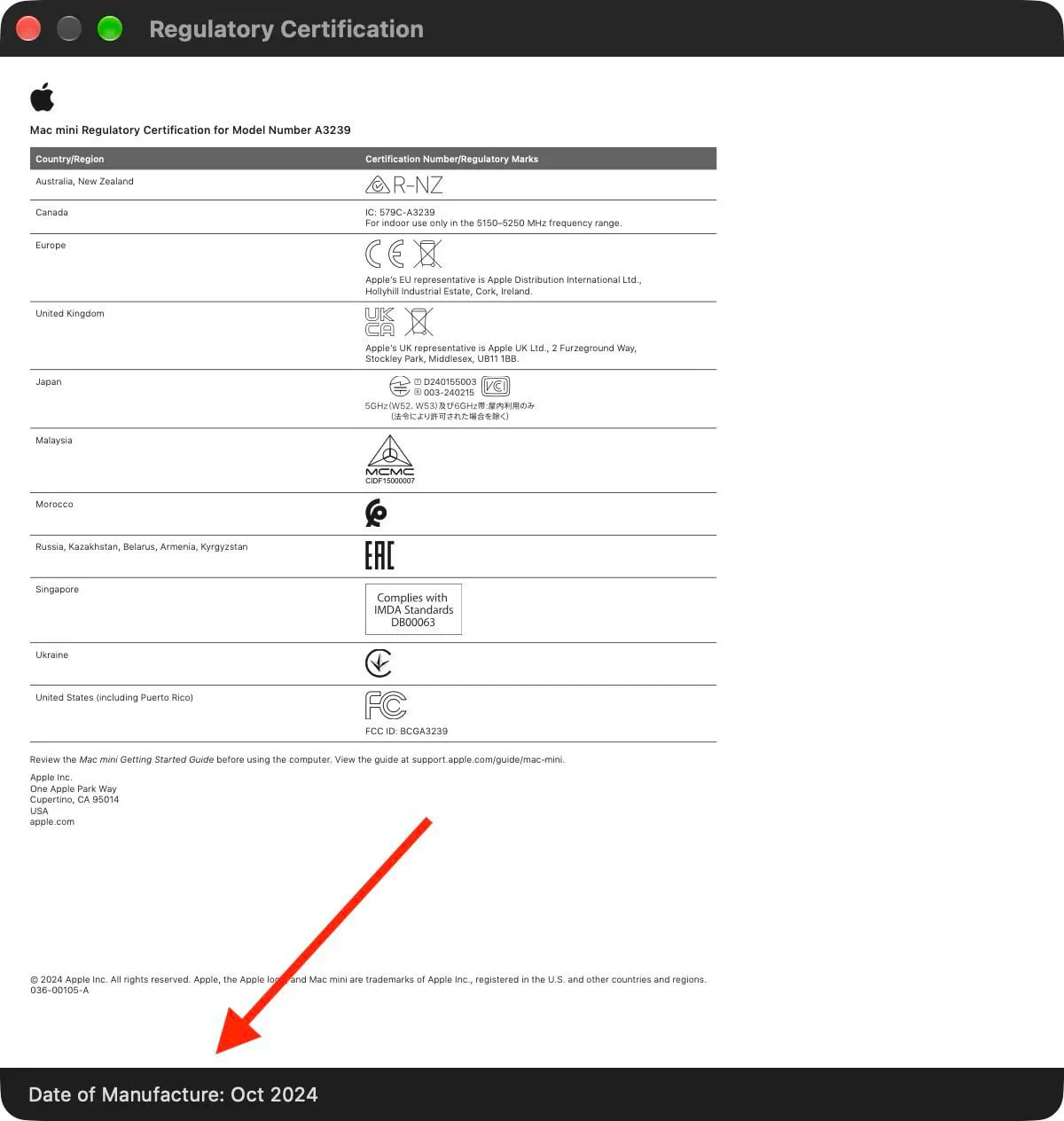 Photo: MacRumors: Mac News and Rumors - Front Page (source)
| Attribute | Legacy Macs (Pre-2021) | Macs on macOS 12–macOS 15 | Macs on macOS 27 Golden Gate | iPhone / iPad (Recent iOS) |
|---|---|---|---|---|
| Serial Structure | 12-character encoded | 10-character randomized | 10-character randomized | Randomized |
| Lookup Method | Third-party web decoders | None (except contacting Apple) | Built-in UI menu | Settings > General > Legal |
| Granularity | Production week & factory code | Unavailable to consumers | Exact date / month stamp | Month and year / compliance date |
| Third-Party App Reliance | High (CoconutBattery, Chipmunk) | Blocked by encryption/randomness | None required | None required |
Apple had already moved to display equivalent certification data on mobile devices under Settings ➝ General ➝ Legal & Regulatory. Bringing this parity to macOS ensures that desktop and laptop users enjoy the same transparency without having to dig through developer toolchains.
The Hardware Caveat: Logic Boards vs. Assembled Chassis
Early testing by forum users revealed a vital nuance: the date shown in the Regulatory Certification window appears to reflect the manufacture date of the machine’s logic board, not necessarily the date the final unibody chassis was screwed together.
In one MacRumors community case, a user purchased a Mac in November 2024. In April 2025, the computer underwent an official Apple warranty repair that required a full logic board replacement. After upgrading to macOS 27, the computer’s Regulatory Certification panel reported a manufacture date of February 2025—three months after the customer originally took delivery of the machine.
Code inspections of macOS 27 indicate that the SettingsFoundation system framework retrieves the date from a low-level regulatory metadata catalog embedded on the mainboard, falling back to serial-inferred tables when metadata is absent. Consequently, if your Mac has ever undergone board-level repair or refurbishing by Apple Authorized Service Providers, the date displayed may reflect the birth of the replacement silicon rather than the initial retail unit.
What This Means for Secondhand Buyers and Everyday Users
 Photo: macrumors.com (source)
For consumer electronics shoppers, knowing a device’s true age is about more than trivia; it directly impacts valuation and maintenance.
- Used Market Transparency: Sellers on platforms like eBay, Swappa, or Facebook Marketplace frequently claim a laptop was "barely used" or "purchased recently." macOS 27 gives prospective buyers a fast check during in-person inspections to verify whether an "M3 MacBook Air" was made during launch week or rolled off the assembly line right before the M4 refresh.
- Battery Degradation Expectations: Lithium-ion battery chemistry degrades from the moment of fabrication, even if a machine sits sealed in retail packaging. Comparing the manufacture date with current battery cycle counts helps buyers judge shelf aging.
- Warehouse Inventory Checks: Retail discount buyers can confirm whether a discounted laptop from a big-box retailer was recently assembled or represents clearance inventory that has sat idle for months.
Unanswered Questions and Next Steps
While macOS 27 restores welcome visibility, questions remain regarding how backward-compatible this field is with older Intel-based Macs and earlier Apple silicon generations that initially shipped with macOS Monterey or Ventura. Additionally, it remains unclear whether future macOS updates will clarify the distinction between chassis assembly and mainboard replacement dates in the UI to prevent consumer confusion during trade-ins.
For now, users running macOS 27 Golden Gate can view their hardware's origin story in a matter of clicks.
FAQ
Can I check the manufacture date if my Mac is on macOS 15 Sequoia or earlier?
No, the dedicated "Date of Manufacture" field inside the Regulatory Certification pane is exclusive to macOS 27 Golden Gate and later releases. Older operating systems only display standard regulatory compliance seals without the embedded manufacturing timestamp.
Why does my manufacture date show a time after I bought the Mac?
If your Mac's logic board was replaced during a warranty repair or service visit, the certification utility reads the manufacture date of the replacement board rather than the original computer.
Does this feature work on refurbished Macs bought from Apple?
Yes, refurbished Macs running macOS 27 will display a manufacture date. Depending on whether the unit was re-boarded during Apple's recertification process, the date will correspond to either the initial logic board build or the refurbished replacement component.
Does checking this require administrative or root privileges?
No, opening the Regulatory Certification pane in System Settings can be done by standard user accounts. Only the advanced Terminal command for reading unformatted debug logs requires appropriate console logging access.