WhatsApp is rolling out an update to its official Apple Watch companion app that allows users to react to messages with any emoji available on watchOS. The feature, which expands on the platform's initial wrist-based reaction system, eliminates a longstanding annoyance by giving smartwatch owners access to the full emoji library without needing to reach for their iPhones.
For months, Apple Watch users interacting with incoming WhatsApp texts were limited to a fixed tray of just six reaction glyphs. With this latest server-side and app update rolling out across supported regions, the wrist interface now mirrors the flexibility found on the mobile and desktop versions of the messaging service.
Unlocking the Full Emoji Palette on the Wrist
When WhatsApp debuted its standalone companion client for Apple Watch, message reactions were among the headline capabilities. However, the initial rollout strictly locked interactions to a tiny six-icon grid: Thumbs Up (👍), Red Heart (❤️), Face with Tears of Joy (😂), Surprised Face (😮), Crying Face (😢), and Folded Hands (🙏). If a conversation called for a shrug, a skull, fire, or a simple checkmark, smartwatch users had no choice but to pull their phone from their pocket.
The updated interface introduces a dedicated expansion button directly within the quick-action reaction menu. When users tap and hold on any individual message bubble inside a chat, the familiar six-item bar appears alongside an additional selector button. Tapping this button brings up the watchOS emoji browser, organized for compact touchscreens.
At the top of this picker, users find a row of their most recently used emojis, ensuring that personal favorites remain readily accessible without continuous scrolling. Below that, WhatsApp organizes the entire Unicode collection across 8 dedicated categories:
- Smileys & People (facial expressions, hand gestures, avatars)
- Nature (animals, plants, weather symbols)
- Food & Drink (meals, ingredients, beverages)
- Activities (sports, games, recreational hobbies)
- Travels (places, transit, vehicles, buildings)
- Objects (household tools, electronics, office gear)
- Symbols (hearts, badges, warning signs, geometric figures)
- Flags (territories and national banners)
How WhatsApp Apple Watch Reactions Compare
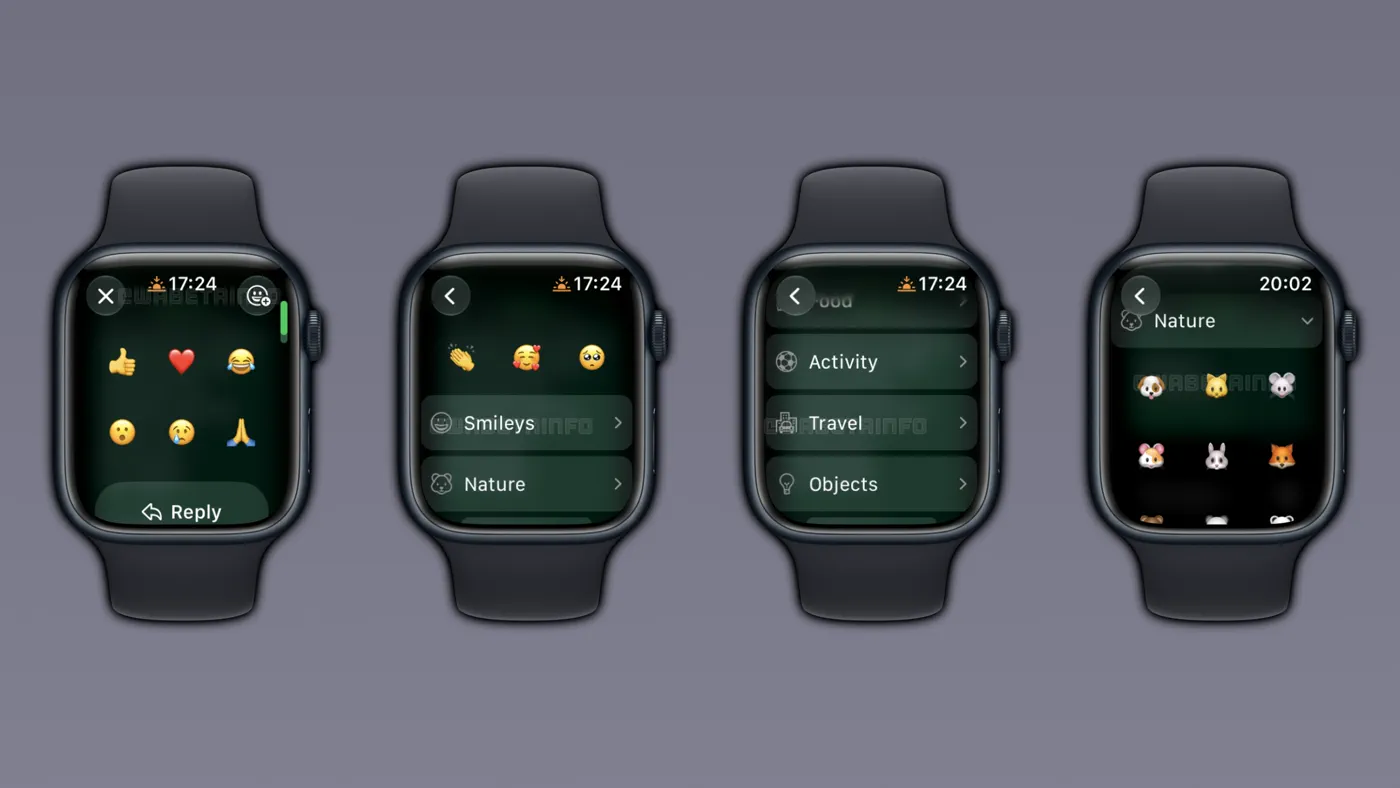 Photo: wabetainfo.com (source)
Smartwatch messaging requires a delicate balance between quick access and manageable interface clutter. By transitioning from a rigid reaction tray to a full catalog picker, WhatsApp aligns its watchOS software with modern wearable messaging standards.
| Feature | WhatsApp on Apple Watch (Legacy) | WhatsApp on Apple Watch (New) | WhatsApp on iPhone | Apple iMessage (watchOS) | Telegram on Apple Watch |
|---|---|---|---|---|---|
| Reaction Palette | Fixed 6 emojis | Full watchOS catalog | Full Unicode catalog | Full catalog (via sticker/emoji) | Full emoji set |
| Access Method | Tap-and-hold | Tap-and-hold + menu button | Long-press + "+" icon | Tap-and-hold (Tapback) | Long-press message |
| Recent Emojis | No | Yes (top row) | Yes | Yes | Yes |
| Categorized Browsing | None | 8 categories | Search bar + categories | Scrollable selector | Scrollable category tabs |
| Phone Required to Expand | Yes | No | N/A | No | No |
| Hardware Requirement | Series 4 or later | Series 4 or later | iPhone running iOS 15.1+ | Series 4 or later | Series 4 or later |
The Road to Smartwatch Parity
WhatsApp’s journey on watchOS has been a gradual process. For years, Apple Watch owners could only interact with WhatsApp through mirror notifications forwarded from an iPhone. These notification banners offered rudimentary canned replies or speech-to-text dictation, but offered no true chat history, voice note player, or reaction menus.
That changed in late 2025 when Meta rolled out its dedicated companion client alongside app version 25.34.75. The native app brought full chat browsing, media thumbnail previews, voice memo playback, and inline reactions. Even so, the omission of an expanded emoji picker left the wrist application feeling distinctly secondary to both the iPhone app and WhatsApp’s Wear OS client for Android smartwatches, which had received broader interactive perks earlier.
The addition of the full emoji sheet resolves one of the most common user requests submitted since the companion client went live. By utilizing native watchOS scrolling components and touch targets optimized for both 40/41mm and 44/45/49mm casings, navigation remains responsive even on compact displays.
Wrist-First Messaging: Why It Matters for Wearers
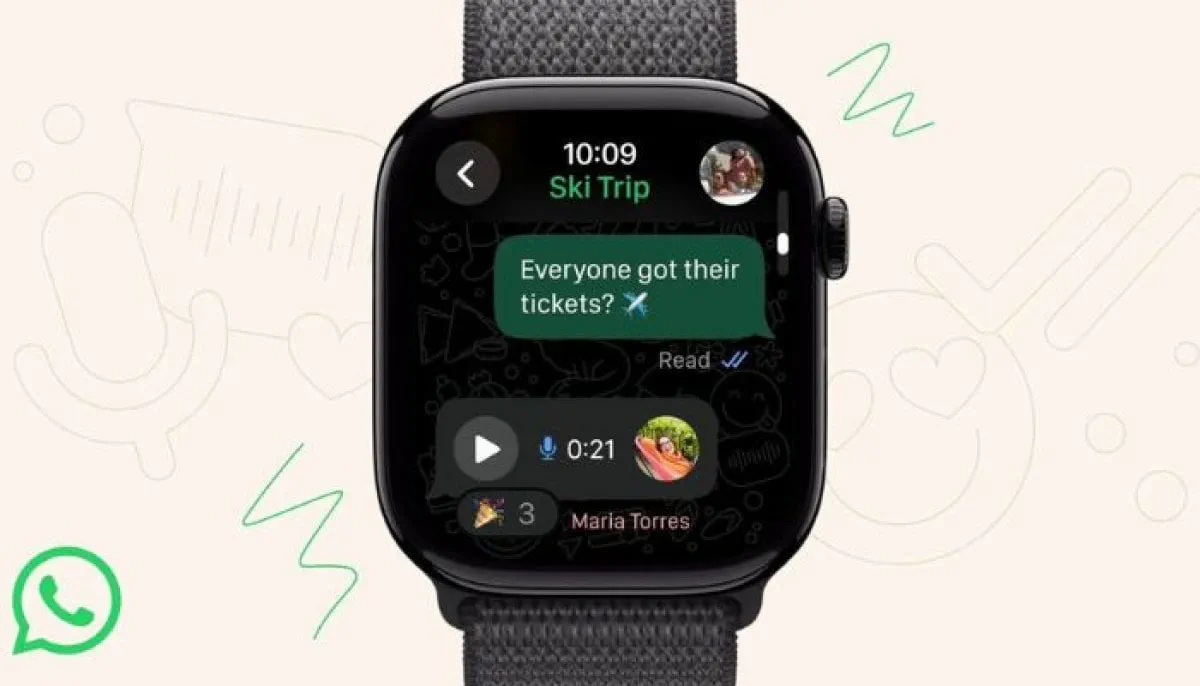 Photo: thenews.com.pk (source)
Micro-interactions are the foundational premise of wearable tech. Taking out a smartphone, unlocking it, locating a chat thread, and choosing a response interrupts whatever a user is doing. In contrast, tapping a quick reaction from the wrist takes two to three seconds.
However, emoji culture relies heavily on nuance. A standard thumbs-up or crying-laughing face often fails to convey the intended context, whether someone is signaling agreement with a party popper, responding to a joke with a skull, or acknowledging a task with a checkmark. With this update, users no longer face a barrier where their emotional expression depends on whether they are willing to retrieve their iPhone.
Furthermore, because reactions do not generate intrusive new notification chimes in group threads, being able to tap any relevant emoji reduces conversational clutter across active family or work channels.
Community Reaction and Practical Usability
Early feedback across Apple communities and messaging forums has been largely enthusiastic, particularly among runners, commuters, and fitness enthusiasts who rely on cellular-enabled Apple Watches. Smartwatch users frequently pointed out the inconsistency of being able to dictate complex text messages via Siri yet being arbitrarily blocked from choosing a simple "🔥" or "👀" reaction.
Power users have noted that while scrolling through hundreds of emojis on a 1.9-inch display could theoretically feel cumbersome, the placement of the recently used row prevents interface fatigue. Because most communicators rely on a small core group of 10 to 20 icons during standard daily interactions, the watch app surfaces those favorites immediately without forcing repetitive category searches.
What Comes Next for WhatsApp on watchOS
 Photo: thenews.com.pk (source)
While the expanded emoji reaction library closes a major usability gap, several feature requests remain on the roadmap. Meta has recently been testing customizable default reaction trays in its iOS beta builds (version 26.32.10.16), allowing testers to replace the base six icons with custom favorites. It is currently unconfirmed whether personalized default trays will eventually sync automatically between the iPhone and Apple Watch.
Additionally, users continue to request true standalone cellular functionality. While the watchOS app functions when away from the iPhone on active Wi-Fi or LTE connections, initial device registration, contact management, and media backups still tether back to the primary handset.
To access the expanded emoji reaction picker today, ensure that WhatsApp on your paired iPhone is updated to the latest release via the App Store, and confirm your Apple Watch is running watchOS 10 or later.
FAQ
How do I react with a custom emoji on my Apple Watch?
Tap and hold the message bubble you want to respond to until the six-icon reaction bar appears. Tap the new selector button at the end of the bar to open the full emoji keyboard, then select your emoji from your recent history or one of the eight categories.
Which Apple Watch models support this feature?
The feature is supported on any hardware compatible with the native WhatsApp companion app, which includes Apple Watch Series 4, Series 5, Series 6, Series 7, Series 8, Series 9, Series 10, Apple Watch SE, and Apple Watch Ultra running watchOS 10 or later.
Can I change the default six emojis shown in the quick tray?
Not yet. While Meta has tested customizable quick-reaction default sets in iPhone TestFlight beta builds, the Apple Watch companion app still defaults to the standard six emojis before opening the full keyboard.
Does this update require a paid subscription?
No. The full emoji reaction feature on watchOS is completely free and is rolling out to all users as part of the standard WhatsApp application update.