Apple is actively exploring software solutions to fix a widely criticized layout issue in Safari on its new foldable iPhone Duo. Following early reviews highlighting cramped mobile web browsing on the phone's compact cover screen, WebKit developer advocate Jen Simmons confirmed on the official WebKit blog that Apple wants to give web designers better ways to utilize the outer screen's full display real estate.
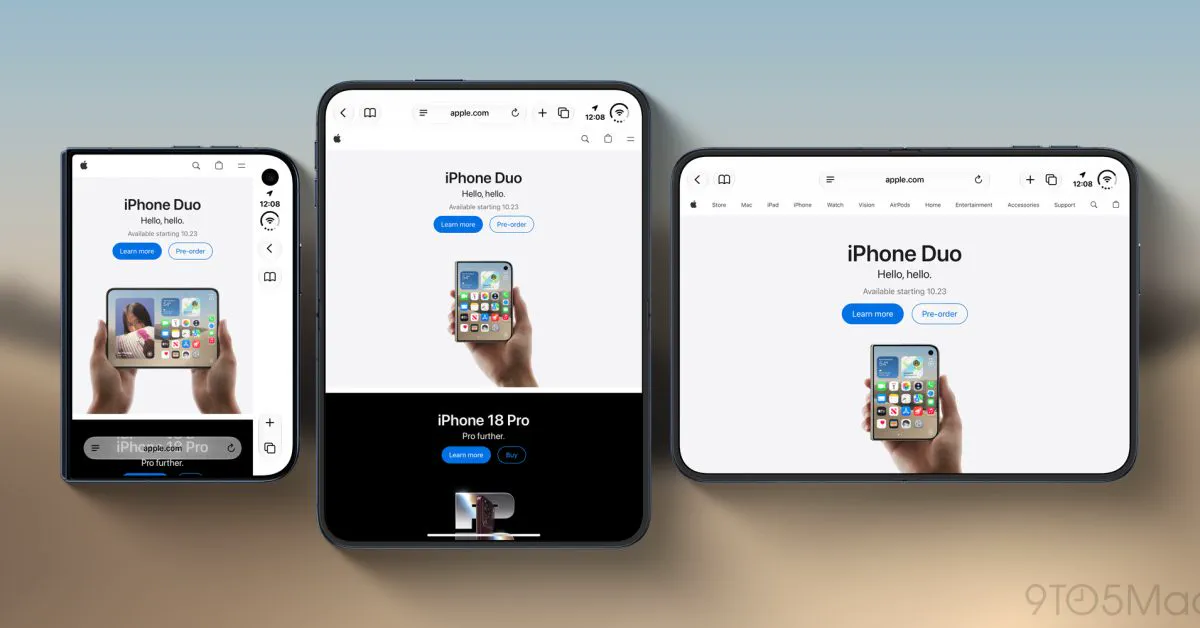
The layout friction surfaced alongside the retail debut of the iPhone Duo, Apple's first book-style foldable device featuring a 5.4-inch outer cover display paired with a larger 7.6-inch inner folding screen. While the expansive interior panel has earned critical praise for browsing, the closed form factor has proven surprisingly awkward for web reading. Safari's current interface places persistent controls along the right edge of the screen, noticeably squeezing horizontal space on an already narrow viewport. Apple is now soliciting developer input as it works on a cleaner, standards-based remedy.
What Apple Announced on the WebKit Blog
Writing in an overview of Safari 27.1—the software release shipping exclusively alongside the iPhone Duo—Jen Simmons addressed how WebKit handles the unique dual-screen architecture of Apple's foldable. Crucially, she directly acknowledged the visual bottleneck affecting the outer display.
Simmons noted that Safari currently prevents websites from extending underneath the browser’s right-aligned control column. Instead, Safari simply paints that vertical gutter using the webpage's background color to maintain visual separation without breaking content legibility. Apple admitted that this is an interim compromise rather than an ideal long-term design.
"We would like to give web designers and developers the ability to design and use that space in more creative ways," Simmons wrote. "Perhaps you want to extend your header background across the full width of the display, for example. It might seem like there's just one obvious way to make this possible, but really there are many possibilities."
The Technical Problem: Why the Outer Display Feels Squeezed
 Photo: gizchina.com (source)
The root of the problem lies in the iPhone Duo's industrial design and interface geometry. The cover panel measures 5.4 inches, making it physically narrower than standard baseline iPhone displays.
When holding the closed phone, Safari positions a vertical control bar on the right side of the screen. This column hosts essential elements, including:
- The front camera sensor cutout and system clock
- Safari navigation buttons: Back and Forward
- Direct triggers for Reader Mode, new tabs, and tab overview controls
Because this strip occupies valuable lateral width, the actual rendering viewport for web content is squeezed significantly inward. On websites that use floating header menus, sticky cookie consent banners, and prominent social bars, the readable portion of an article on the outer screen can shrink to a fraction of the panel. Once an on-screen keyboard appears for forms or search bars, vertical and horizontal room deteriorates further.
Why a Simple CSS Fix Isn't Enough
Technically inclined users and developers have questioned why Apple didn't simply enable viewport-fit=cover, an existing HTML meta-tag parameter that allows web content to bleed into device safe areas.
According to Simmons, deploying a broad override creates significant real-world breakage. While advanced sites correctly handle CSS environment variables like safe-area-inset-*, millions of legacy websites do not account for insets on all four margins. Forcing full bleed by default could hide clickable navigation, text, or interactive buttons right behind Safari's fixed control rail.
"We are investigating if there's a better way to accomplish the same result — something more foolproof and perhaps easier for you to use," Simmons explained, inviting web developers to submit architectural proposals to the WebKit bug tracker and web standards channels.
| Display Mode | Physical Screen Size | Effective Viewport Width | Browsing Experience |
|---|---|---|---|
| iPhone Duo Outer Screen | 5.4 inches | ~382 CSS pixels | Narrow content column constrained by vertical control strip |
| iPhone Duo Inner Screen | 7.6 inches | Up to 951 CSS pixels | Tablet-class expansive layout; side-by-side tabs and book-style reading |
| Standard iPhone | 6.1 – 6.9 inches | ~393 – 440 CSS pixels | Traditional bottom toolbar layout with full horizontal bleed |
New Foldable Features Already Live in Safari 27.1
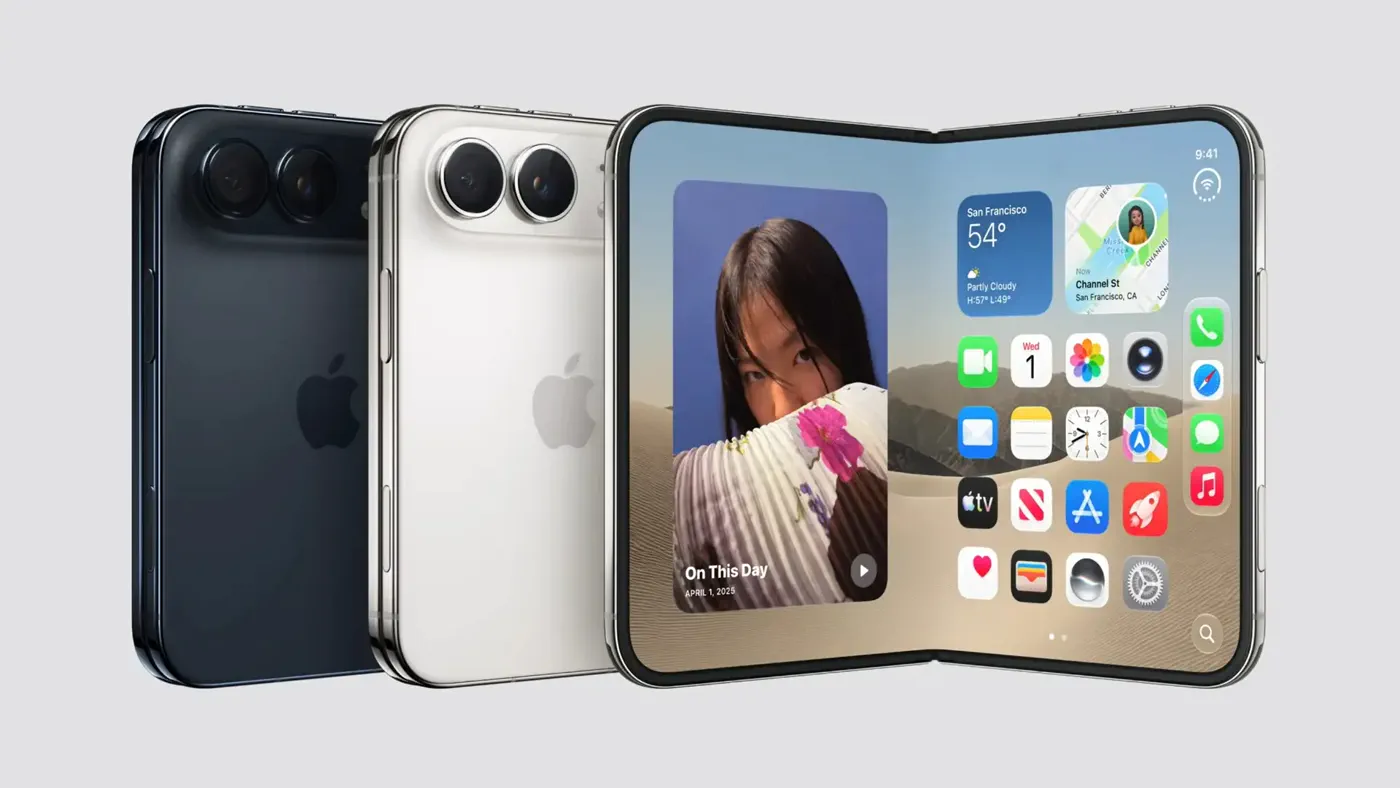 Photo: gizchina.com (source)
While layout refinements for the outer display remain a work in progress, Safari 27.1 does include several features engineered specifically for foldable hardware:
- Book Posture Two-Page PDFs: When the iPhone Duo is propped open partially in a laptop or book-like angle, Safari automatically splits online PDF files into two facing pages across the internal hinge. Unfolding the device flat or snapping it shut immediately returns the document to single-page flow.
- Device Posture API: Shipped as an experimental preview under Safari's Advanced Feature Flags, this Web standard allows developers to detect whether the phone is closed, flat, or folded in half.
- Viewport Segments API: Also available under feature flags, this tool helps CSS detect the physical hinge coordinates so web apps can split menus and content across the crease without distortion.
- Xcode Simulator Tools: Developers using Xcode 27.1 gain access to full iPhone Duo viewport simulations ranging from 382 to 951 CSS pixels wide.
Reviewers and Community Reaction
The WebKit team’s candid admission follows unified feedback from early device reviewers, who noted an acute disparity between the phone’s two screens. In his review for 9to5Mac, Chance Miller highlighted the friction directly:
"The web simply isn't optimized for this form factor... the right-aligned controls on iPhone Duo eat into the usable screen real estate in Safari especially. I can see why Apple chose the design it did for Safari on the iPhone Duo. I don't think overlapping the controls with the website would've made sense. Still, scrolling in Safari is one of the best examples of something that's better on the inner screen."
Similarly, John Gruber noted on Daring Fireball that while the inner 7.6-inch panel provides one of Apple's finest portable reading experiences, the narrow outer screen often feels cramped during quick single-handed tasks. The broader web development community on social platforms praised the WebKit team for engaging transparently rather than quietly shipping a broken auto-zoom or forced cropping hack.
Practical Advice for iPhone Duo Users
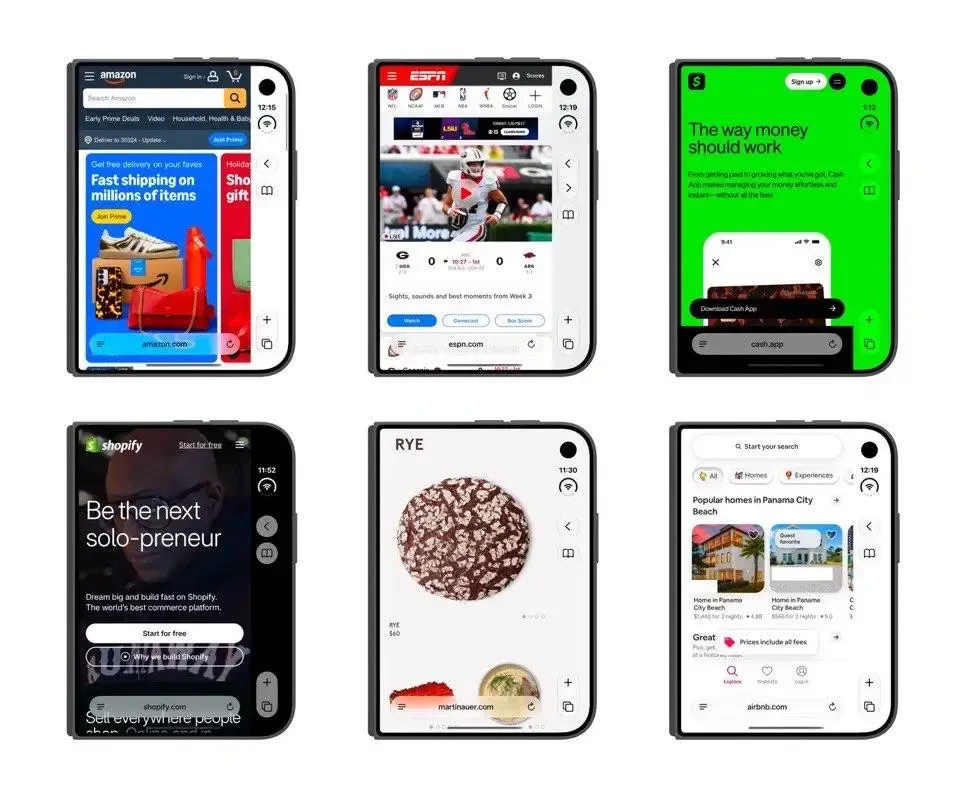 Photo: gizchina.com (source)
If you have purchased an iPhone Duo and find yourself struggling with truncated articles or squished layouts on the cover display, a few built-in tools can help ease the burden today:
- Switch to Safari Reader: Tap the Reader icon nestled in the right-hand bar. Reader mode eliminates ads, sticky headers, and side gutters, reformatting the pure text to fill the available column cleanly.
- Adjust Page Zoom: In the Safari address menu, lower the default zoom to 85% or 75% on the outer screen. This broadens responsive desktop and tablet breakpoints without damaging column proportions.
- Request Desktop Website Sparingly: While requesting desktop mode can force full navigation menus to appear, it often makes body copy too small on a 5.4-inch glass panel. Reserve desktop mode for complex forms.
- Open the Device: For heavy web reading, unfolding the phone instantly transitions the session onto the spacious 7.6-inch screen without losing your scroll position.
What Happens Next
Apple has not committed to a specific point release for its upcoming cover display fix. While general iPhone models are slated to jump directly from iOS 27.0 to iOS 27.2, the iPhone Duo is currently running its own build track on iOS 27.1.
WebKit engineers are currently reviewing developer feedback regarding new CSS environment properties or browser control transparency modes. Future developer betas of iOS 27 are expected to introduce refined heuristics that expand header banners into the right rail while keeping interactive website elements safely confined to the primary touch zone.
FAQ
Why does Safari look different on the iPhone Duo outer display? To accommodate the phone's narrow screen and camera cutout, Safari clusters its primary navigation and tab tools into a persistent vertical rail on the right edge, which narrows the visible webpage area.
When will Apple release a fix for the cramped layout? Apple has confirmed it is exploring fixes, but the WebKit team has not yet announced an official release date or software update version for the layout overhaul.
Can website owners fix this issue themselves right now? Not completely. Because Safari 27.1 intentionally prevents web content from painting under the right-hand control bar, web designers cannot stretch custom content behind the controls without new WebKit APIs.
Does this cramped design affect the iPhone Duo's main inner screen? No. The unfolded 7.6-inch inner panel uses standard iPad-style or full-width desktop viewports that provide ample room for toolbars and website columns side by side.