Apple has officially rolled out a firmware update for compatible AirPods models that adds a long-requested three-band custom equalizer. Arriving alongside the public release of iOS 27, the firmware update (build 9A350) gives listeners manual control over low, mid, and high audio frequencies for the very first time on Apple's wireless earbuds and headphones.
For years, Apple insisted on automated acoustic tuning via its proprietary Adaptive EQ, keeping manual tone controls locked away. This quiet software update fundamentally alters that philosophy, allowing users to dial in punchier bass, warmer vocals, or brighter treble directly within system settings. Even better, custom profiles are written directly to the headphones' onboard memory, keeping your tuned sound signature active across all paired devices.
What Just Happened: Custom EQ Arrives on AirPods
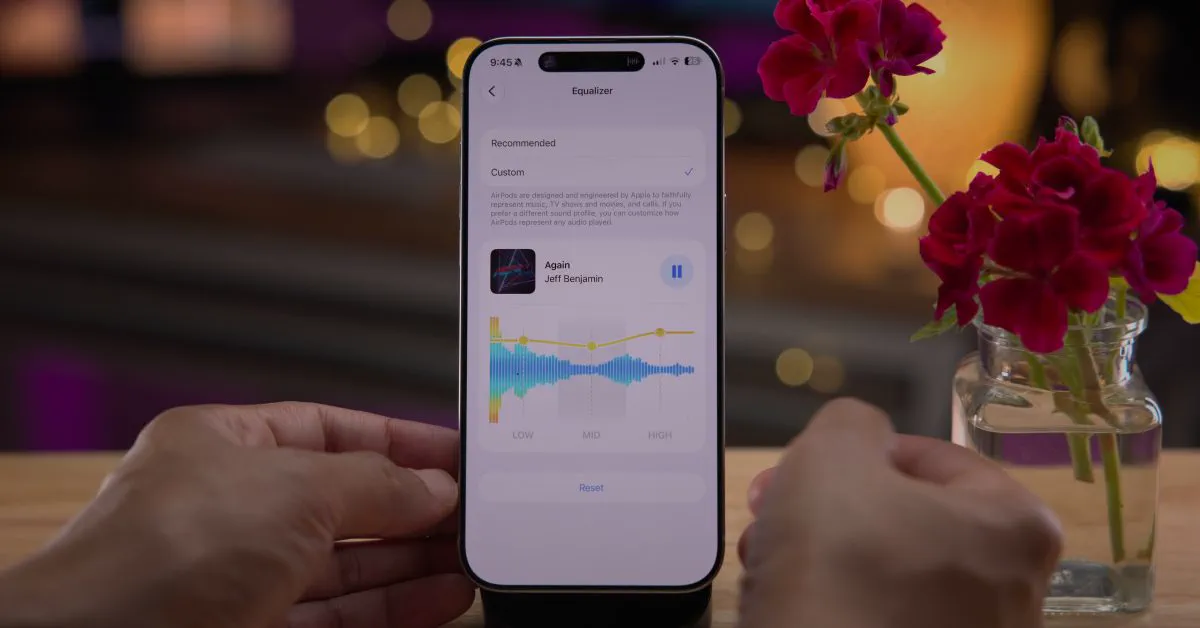
While software headlines were dominated by the rollout of iOS 27, Apple quietly delivered firmware version 9A350 to its audio lineup. Buried inside the AirPods menu in the Settings app is a feature audio enthusiasts have spent years requesting: a dedicated Equalizer menu featuring a Custom preset.
Instead of forcing users to rely entirely on Apple's factory acoustic curve, the new software lets listeners personalize audio reproduction system-wide. The controls apply not just to Apple Music, but across third-party streaming apps like Spotify and YouTube Music, video playback, podcasts, and mobile games.
"AirPods are designed and engineered by Apple to faithfully represent music, TV shows and movies, and calls," Apple notes in the interface description. "If you prefer a different sound profile, you can customize how AirPods represent any audio played".
Watch: AirPods Update for iOS 27 - What's New?

Video: zollotech on YouTube
How the New Three-Band Equalizer Works
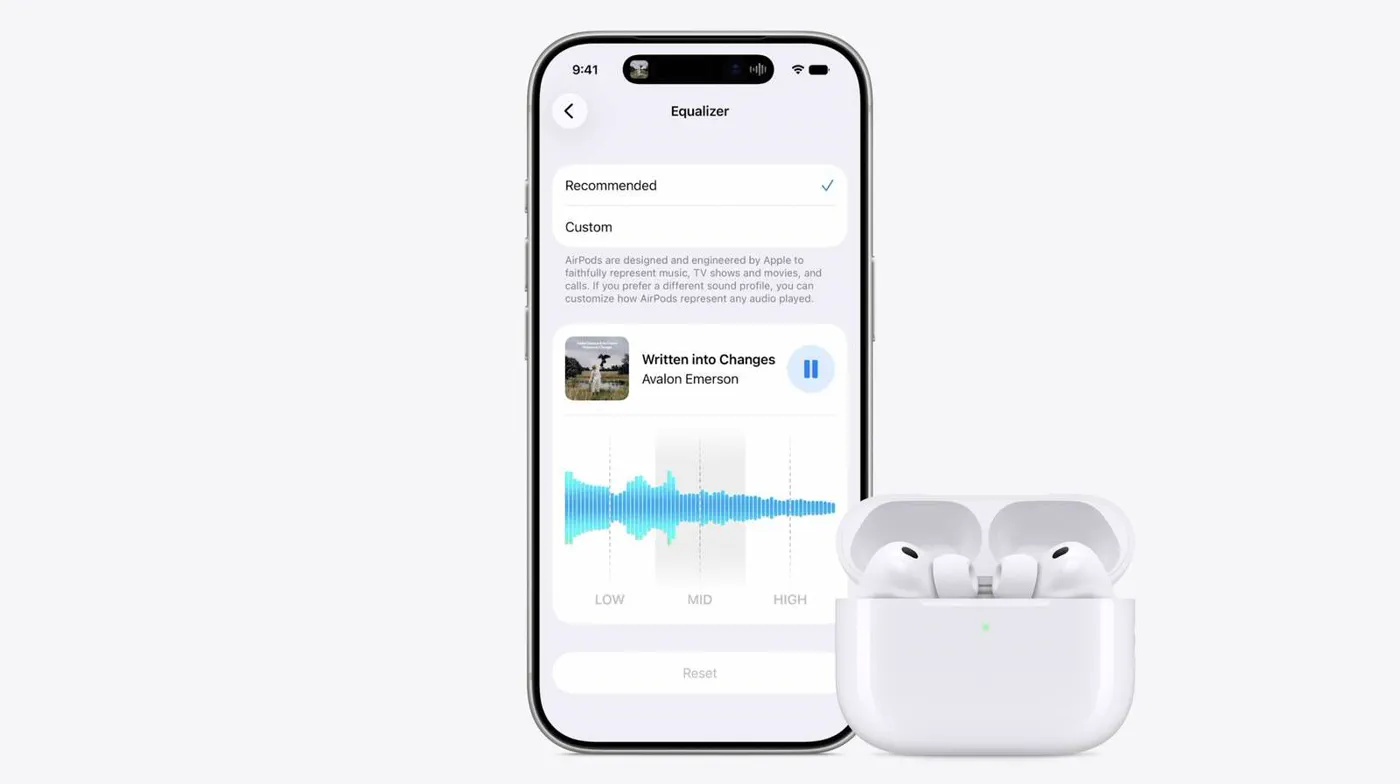 Photo: macrumors.com (source)
Apple’s implementation of custom equalization is clean, direct, and straightforward:
- Three Frequency Sliders: The tool splits audio into Low (bass), Mid (midrange vocals and instruments), and High (treble and detail) bands.
- Real-Time Apple Music Preview: When opening the Equalizer menu while connected to Apple Music, users can play a track directly inside the Settings pane to audition adjustments in real time.
- Live Waveform Feedback: As you drag each frequency slider up or down, the interface displays visual audio waveforms to illustrate how the acoustic profile shifts.
- Hardware-Level Storage: Rather than storing the profile in iOS, settings are saved directly to the AirPods hardware. When you disconnect from your iPhone and pair with an Apple TV, Mac, iPad, or Apple Watch, your customized sound profile carries over seamlessly.
- One-Tap Reset: If a tuning adjustment goes awry, switching the setting back to Recommended immediately restores Apple's default factory calibration.
Hardware Compatibility: Which Models Support Custom EQ?
The feature is not universal across the entire AirPods catalog. Custom EQ requires models powered by Apple’s H2 chip or later, leaving older hardware running on the original H1 chip behind.
| AirPods Model | Chipset | Custom EQ Support | Firmware Version |
|---|---|---|---|
| AirPods Pro 3 | H2 / Next-Gen | Yes | Build 9A350 |
| AirPods Pro 2 (USB-C & Lightning) | H2 | Yes | Build 9A350 |
| AirPods 5 (All Models) | H2 / Next-Gen | Yes | Build 9A350 |
| AirPods 4 (Standard & ANC) | H2 | Yes | Build 9A350 |
| AirPods Max 2 | H2 | Yes | Build 9A350 |
| AirPods 3 | H1 | No | Legacy Firmware |
| AirPods Pro (1st Gen) | H1 | No | Legacy Firmware |
| AirPods Max (Lightning, 1st Gen) | H1 | No | Legacy Firmware |
| AirPods (2nd Gen) | H1 | No | Legacy Firmware |
Owners of original H1 hardware remain limited to Apple’s standard factory sound profile and preexisting accessibility audio tweaks.
How to Enable and Adjust Custom EQ on iPhone, iPad, and Mac
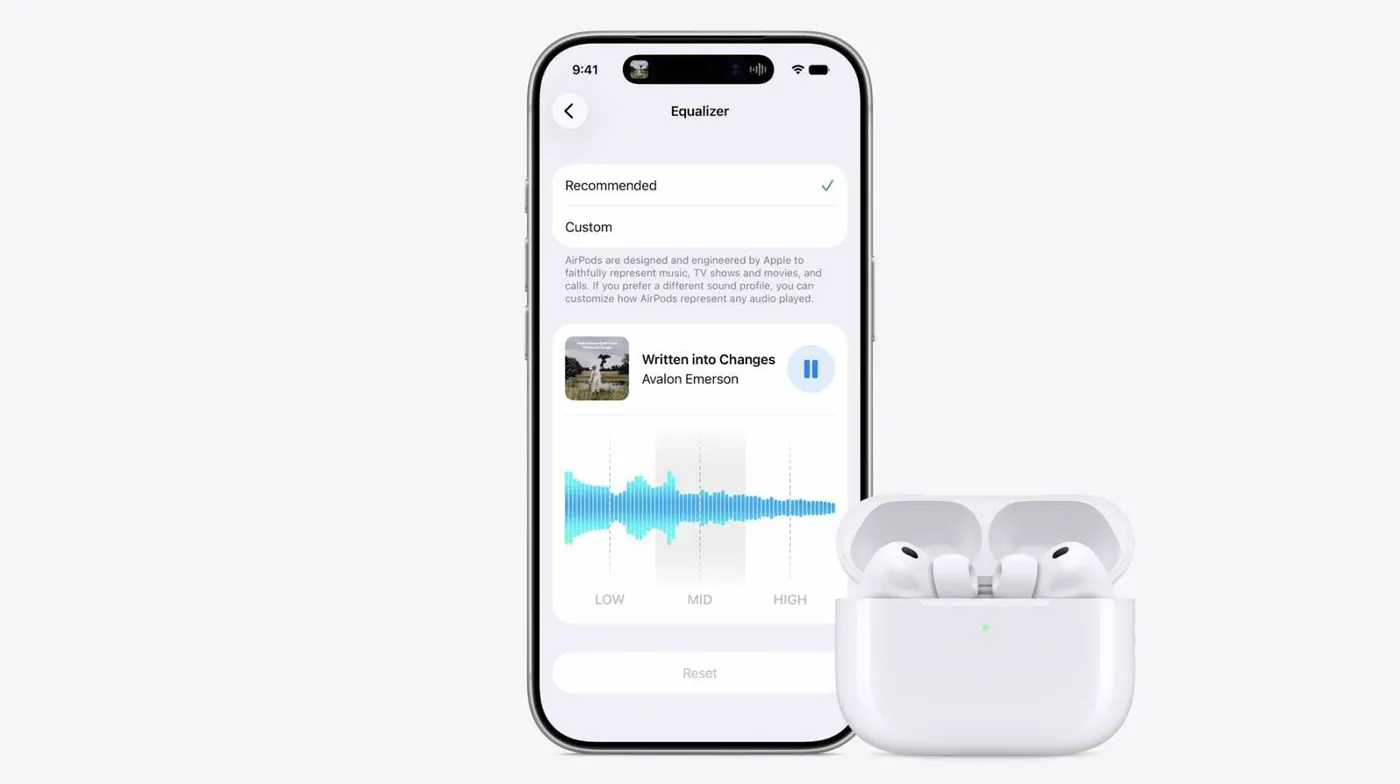 Photo: macrumors.com (source)
Getting custom sound running requires your paired Apple device to run iOS 27, iPadOS 27, or macOS Sequoia's latest release, alongside firmware build 9A350.
On iPhone and iPad:
- Place your AirPods in your ears and confirm they are actively connected to your device.
- Open the Settings app and tap your AirPods' name near the top of the main screen.
- Scroll down and tap Audio & Routing.
- Select Equalizer, which defaults to Recommended.
- Select Custom, then adjust the Low, Mid, and High sliders to your preferred listening profile.
On Mac:
- Connect your AirPods to your Mac.
- Open System Settings and click on your AirPods in the left sidebar.
- Navigate to Audio & Routing > Equalizer > Custom.
- Use the cursor to drag the three frequency sliders.
The Background: Why Apple Resisted Custom EQ for a Decade
When Apple debuted the original AirPods in 2016, the company positioned simplicity and seamless integration as its core tenets. Rather than giving listeners complex graphic equalizers, Apple introduced Adaptive EQ starting with the original AirPods Pro. Adaptive EQ used inward-facing microphones to measure audio signals inside the ear canal and adjusted low and mid frequencies up to 200 times per second to compensate for fit variations.
While Adaptive EQ delivered balanced, non-fatiguing sound, audiophiles and everyday listeners frequently complained about the lack of flexibility. Previous workarounds were clunky: users had to toggle genre presets deep inside the Apple Music settings menu (which did not affect Spotify or YouTube) or navigate complex Headphone Accommodations tucked away under Accessibility settings. With the introduction of Custom EQ, Apple finally balances automated acoustic compensation with personal user preference.
How Apple’s EQ Stacks Up Against Competitors
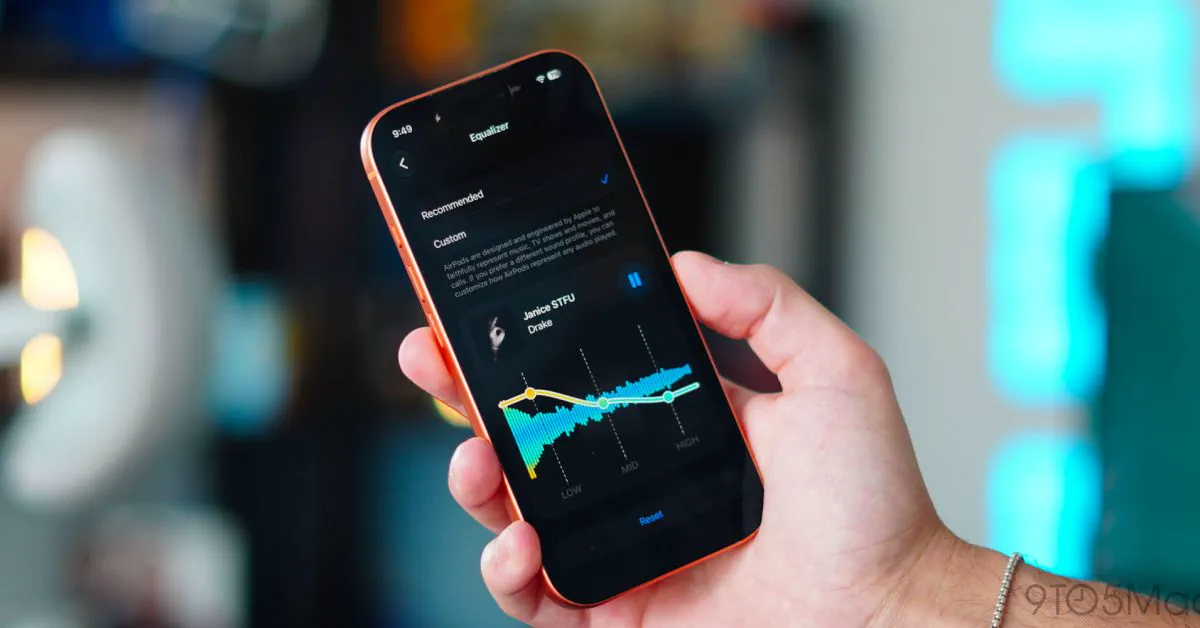 Photo: 9to5mac.com (source)
While Apple’s entry into manual equalization is welcome, it remains basic compared to seasoned audio competitors.
- Sony: The Sony Headphones Connect app provides a comprehensive 5-band equalizer alongside a dedicated "Clear Bass" slider, custom user slots, and an interactive hearing test that automatically tailors frequency curves.
- Bose: Bose headphones and earbuds offer a comparable 3-band EQ (Bass, Mid, Treble) within the Bose app, but include preset jumping points such as Bass Boost, Bass Reducer, and Treble Boost.
- Sennheiser: Sennheiser’s Smart Control platform offers both a 3-band and 5-band parametric equalizer, plus advanced Sound Personalization routines.
- Samsung: The Galaxy Wearable app gives Galaxy Buds owners six curated audio presets (Bass Boost, Soft, Dynamic, Clear, Treble Boost, Normal), though it lacks freeform band sliders.
Apple's advantage is integration: there is no third-party app to install, zero background battery drain from helper utilities, and profile persistence across all Apple ecosystem hardware. However, power users hoping for a 10-band parametric EQ or fine Q-factor controls will find the three broad sliders modest.
Additional AirPods Features Packed Into iOS 27
Firmware 9A350 and iOS 27 do not stop at custom equalizers. The broader platform upgrade includes several notable audio and fitness features:
- GymKit Heart Rate Integration: For AirPods Pro 3 owners, GymKit now allows iPhone to beam live heart rate telemetry gathered from the earbuds' internal sensor directly to compatible gym machines like treadmills, stair climbers, and stationary bikes.
- AirPods 5 Architecture Support: Firmware 9A350 brings complete system support for AirPods 5, accommodating hardware improvements like on-stem volume swipe controls and upgraded noise cancellation algorithms.
- System-Wide Siri AI & Live Translation: When paired with Apple Intelligence-capable iPhones, supported AirPods models enable lower-latency conversational interactions and hands-free Live Translation.
What It Means for Buyers and Current Users
If you own an H2-powered set of AirPods, this update breathes fresh life into your audio experience at zero financial cost. Bass lovers who previously found AirPods Pro 2 or AirPods 4 slightly too sterile can nudge the Low slider up 2 to 3 decibels for deeper, punchier sub-bass without sacrificing vocal clarity. Conversely, spoken-word enthusiasts and podcast fans can elevate Mids to make dialogue stand out in noisy transit environments.
Because Apple pushes firmware automatically without an explicit "Update Now" button, you do not need to hunt through downloads. To prompt your AirPods to install build 9A350, place them inside their charging case, connect the case to power, and leave them near an iPhone or Mac connected to Wi-Fi for approximately 30 minutes.
What’s Next and Unanswered Questions
While Custom EQ solves an eight-year consumer request, questions remain regarding future software enhancements. Community feedback has already asked whether Apple will eventually support multiple customizable slots (such as "Workout Bass" versus "Acoustic Flat") or allow users to assign EQ profiles per playlist or genre. Additionally, audiophiles are eager to see whether Apple will open up more detailed parametric bands or introduce an automated hearing test that builds an EQ curve tailored to individual hearing degradation.
For now, the arrival of simple, responsive tone sliders marks a significant philosophical shift toward user freedom for Apple’s ubiquitous audio platform.
FAQ
How do I check if my AirPods have received the Custom EQ update?
Connect your AirPods to your iPhone, open Settings, tap your AirPods' name, and scroll down to the About section. If the firmware version reads 9A350 (or later) and your phone runs iOS 27, the Equalizer menu will appear under Audio & Routing.
Can I force my AirPods to update their firmware?
Apple does not provide a manual update trigger. Put the AirPods in their case, plug the case into a charger, ensure your paired iPhone or Mac is on Wi-Fi nearby, and wait 20 to 30 minutes for the background install.
Does Custom EQ work when using AirPods with an Android or Windows device?
Because the Custom EQ profile is saved directly to the AirPods hardware memory, the adjustments you set using an Apple device will persist when playing audio on Android, Windows, or gaming consoles. However, modifying the sliders requires an iPhone, iPad, or Mac.
Why don't I see the Equalizer option on my 1st-generation AirPods Pro?
Custom EQ requires Apple's H2 processor or newer. Older models such as the original AirPods Pro, AirPods 2, AirPods 3, and original AirPods Max run on the older H1 chip and do not support this feature.